Prerequisites
Tutorials
Run our De0 Nano tutorial to ensure you have:
- A working version of OpenOCD
- A UART connected to the De0 Nano development board
fusesoc- The FuseSoC build system.- OpenOCD 0.10.0 (As of 2025, versions 0.11.0 and 0.12.0 have jtag timing issues)
or1k-elf-Toolchain as installed in our newlib tutorial.
System
Additionally for the Linux tutorial we will need:
- An x86 Linux workstation
- The
curlandgitcommand line utilities - A serial terminal emulator, here we use
picocom - 2.5 GB of disk space
- (Optional) The
sxutility for sending binaries to the De0 Nano over serial. This is available in thelrzszpackage.
Files
We will download these below.
- linux - Linux kernel source code
- or1k-none-linux-musl-16.1.0-20260704.tar.xz - OpenRISC musl linux userspace toolchain
- busybox-small-rootfs-20250708.tar.xz - Linux rootfs for userspace programs
Linux on De0 Nano Tutorial
In this tutorial we will cover building a Linux kernel and booting it on De0 Nano with a busybox root filesystem. This builds on the De0 Nano hello world FGPA board bring up tutorial. This is a fun way to experiment with a bare bones Linux embedded system.
We break this tutorial down into parts:
- Downloading the pieces
- Compiling the kernel
- Building the FPGA bitstream
- Running the kernel
- Uploading userspace programs over serial
- Using the GPIOs
Downloading the Pieces
To get started we will create a temporary directory and setup our environment, if you plan to do a lot of OpenRISC development consider adding these tools to your PATH permanently.
To get everything you need run:
mkdir /tmp/linux-on-de0nano/
cd /tmp/linux-on-de0nano/

curl -L -O https://openrisc.io/tutorials/de0_nano/de0_nano.cfg

# Clone kernel source, ~2GiB
git clone --depth 1 --branch v7.0.0-rc1 https://kernel.googlesource.com/pub/scm/linux/kernel/git/torvalds/linux.git

# Download a busybox rootfs and our toolchain
curl -L -O https://github.com/stffrdhrn/or1k-rootfs-build/releases/download/or1k-20250708/busybox-small-rootfs-20250708.tar.xz
curl -L -O https://github.com/stffrdhrn/or1k-toolchain-build/releases/download/or1k-16.1.0-20260704/or1k-none-linux-musl-16.1.0-20260704.tar.xz

# Add IP cores to the environment
fusesoc library add fusesoc-cores https://github.com/fusesoc/fusesoc-cores
fusesoc library add elf-loader https://github.com/fusesoc/elf-loader.git
fusesoc library add openrisc-cores https://github.com/openrisc/openrisc-cores
fusesoc library add de0_nano https://github.com/olofk/de0_nano.git

# Check the SoC design is available
fusesoc core show de0_nano

# Extract software needed for the kernel
tar -xf busybox-small-rootfs-20250708.tar.xz
tar -xf or1k-none-linux-musl-16.1.0-20260704.tar.xz

export PATH=$PATH:$PWD/or1k-none-linux-musl/bin
Compiling the Kernel
To build a Linux kernel we use the toolchain, kernel source code and rootfs just downloaded in the following make commands:
make -C linux \
  ARCH=openrisc \
  CROSS_COMPILE=or1k-none-linux-musl- \
  de0_nano_defconfig

make -C linux \
  -j$(nproc) \
  ARCH=openrisc \
  CROSS_COMPILE=or1k-none-linux-musl- \
  CONFIG_INITRAMFS_SOURCE="$PWD/busybox-small-rootfs-20250708/initramfs/ $PWD/busybox-small-rootfs-20250708/initramfs.devnodes"
The first command configures the kernel with the default configuration de0_nano_defconfig which is for the De0 Nano board. The make arguments are as follows:
-C linux- This saves us from having to change directory,makewill run from within the Linux source code directory.ARCH=openrisc- This passes theARCHvariable to the build system selecting the OpenRISC architecture.CROSS_COMPILE=or1k-none-linux-musl-- This passes theCROSS_COMPILEvariable to the build system selecting our toolchain.de0_nano_defconfig- The make target, configures the linux kernel for the build.
The second command builds the kernel. The new argument is:
CONFIG_INITRAMFS_SOURCE=...- This configures the built in root filesystem.
When running on machines with no disk capabilities such as De0 Nano we can use an initfamfs that is built directly into our kernel ELF binary. This is one of the most simple ways to boot Linux but it means that our data is only in RAM and will be lost after reset. Also, it means that updating the rootfs userspace utilties requires rebuilding the kernel.
Building the FPGA bitstream
As with the de0 nano hello world tutorial we can build the bitstream with:
fusesoc run de0_nano --bootrom_file ./build/de0_nano_*/default-quartus/clear_r3_and_jump_to_0x100.vh
Running the Kernel
To start Linux on the De0 Nano development board we need to load the bitstream then upload the kernel image into RAM over the debug interface. The steps being:
- Program the FPGA bitstream onto the FPGA board
- Using GDB load the kernel image - including the embedded rootfs - into RAM
- Reset the FPGA design, kicking off the kernel boot process
Terminal 1
We can program the OpenRISC FPGA bitstream and Linux kernel to the board with the following commands.
fusesoc run de0_nano --pgm quartus

# Run openocd in the background so we can use one terminal.
openocd -f interface/altera-usb-blaster.cfg -f de0_nano.cfg > openocd.log 2>&1 &

or1k-elf-gdb ./linux/vmlinux \
   -ex 'target remote :3333' \
   -ex 'monitor reset' \
   -ex 'monitor halt' \
   -ex load \
   -ex 'monitor reset' \
   -ex detach \
   -ex quit

pkill openocd
The GDB command will connect to OpenOCD, then reset and halt the board making it ready to program. The load command will load the vmlinux ELF binary into the De0 Nano RAM. The next monitor reset command will reset the FPGA design kicking off the Linux boot process.
In a second terminal while the FPGA board is running connect to the serial console using picocom.
Terminal 2
We will use terminal 2 for connecting to the development board.
Open picocom with the following:
cd /tmp/linux-on-de0nano/

picocom -b 115200 /dev/ttyUSB0 --receive-cmd 'rx -vv' --send-cmd 'sx -vv'
To disconnect press Ctrl-a Ctrl-q
To upload files to the board press Ctrl-a Ctrl-s
Adding Custom User Space Programs
To add your own programs to a running board you can use the musl toolchain to build executables as follows:
curl -L -O https://openrisc.io/tutorials/sw/hello/hello.c

or1k-none-linux-musl-gcc hello.c -o hello
This compiles the hello.c program and outputs the binary directly into our local folder.
Next to send the program to the board we can use the XModem command rx per the below steps. Remember, the rx (receive XModem) command runs on the dev board, while the sx (send XModem) command runs on your local machine.
- While in
picocom - On the board run
rx hello - Press
Ctrl-aCtrl-sto initialize send - Select file
hellofrom your local machine - Next
chmodand execute the program
Example program upload and execution
~ # rx hello
C
*** file: hello
$ sx -vv hello
Sending hello, 81 blocks: Give your local XMODEM receive command now.
Bytes Sent:  10496   BPS:1575

Transfer complete

*** exit status: 0 ***
~ # chmod 755 ./hello
~ # ./hello
Hello World!
~ #
If you wish to add your files permanently to the rootfs you can do that using the method described in the Linux on or1ksim tutorial.
Using the GPIOs
The GPIOs on the De0 Nano are available in userspace via the sysfs interface.
There are 2 gpio banks configured in the De0 Nano device tree as follows:
	/* 8 Green LEDs */
	gpio0: gpio@91000000 {
		compatible = "opencores,gpio";
		reg = <0x91000000 0x1>, <0x91000001 0x1>;
		reg-names = "dat", "dirout";
		gpio-controller;
		#gpio-cells = <2>;
	};

	/* 4 DIP Switches */
	gpio1: gpio@92000000 {
		compatible = "opencores,gpio";
		reg = <0x92000000 0x1>, <0x92000001 0x1>;
		reg-names = "dat", "dirout";
		gpio-controller;
		#gpio-cells = <2>;
		status = "disabled";
	};
Note: This is a device tree include file; the gpio1 block is enabled on the De0 Nano board with status = "okay".
We can read from the DIP switches and write to the LEDs with the following commands:
LEDs
# Export a GPIO pin
echo 1 > /sys/class/gpio/chip0/export

# Set it as an output
echo out > /sys/class/gpio/chip0/gpio1/direction

# Turn the LED on (1) or off (0)
echo 1 > /sys/class/gpio/chip0/gpio1/value
echo 0 > /sys/class/gpio/chip0/gpio1/value
DIP Switches
# Export a GPIO pin
echo 0 > /sys/class/gpio/chip1/export

# Set it as an input
echo in > /sys/class/gpio/chip1/gpio0/direction

# Read the DIP Switch
cat /sys/class/gpio/chip1/gpio0/value
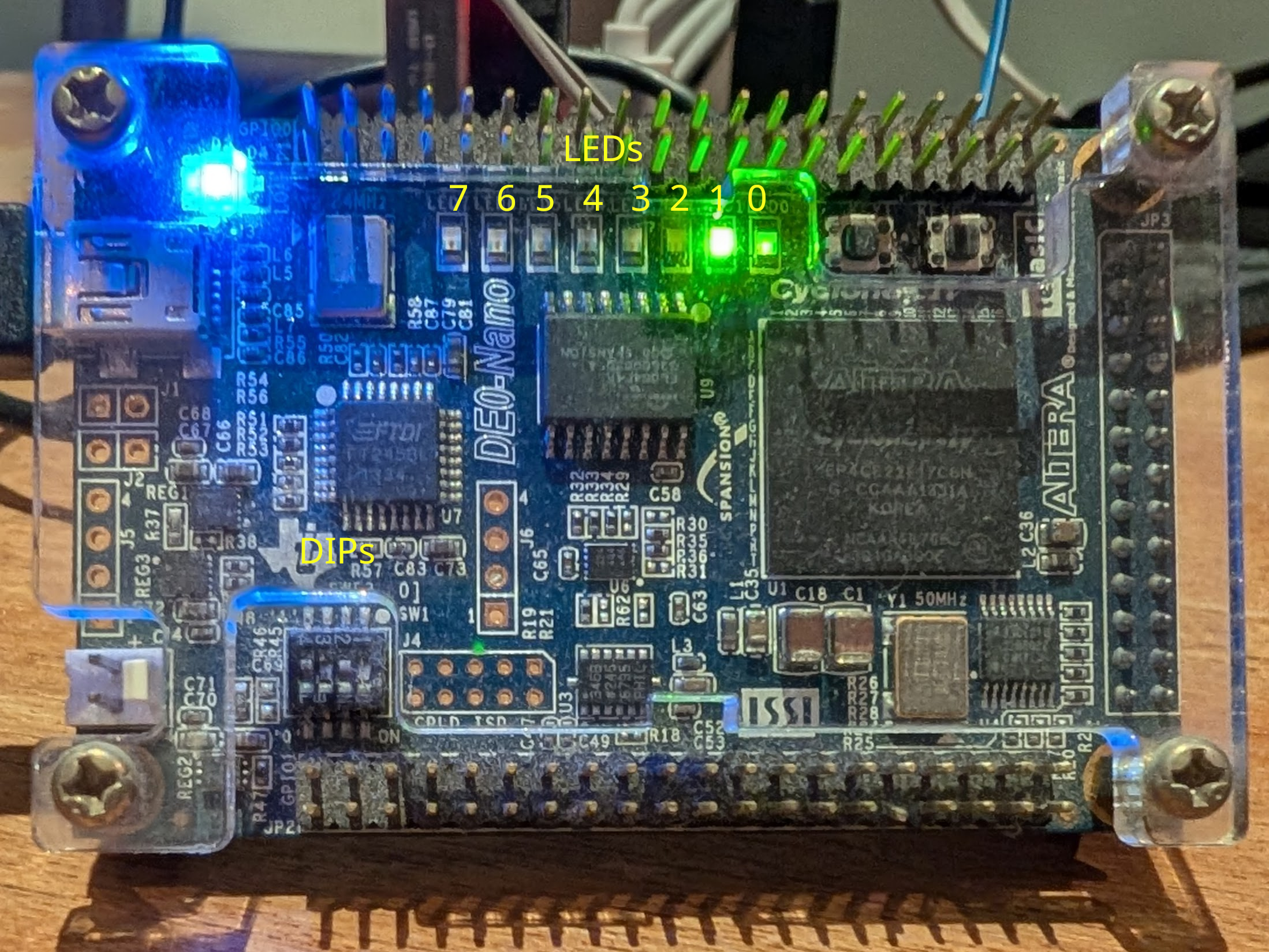
The board with LED 1 on looks like the following. LED 0 is configured to show the heartbeat indicator, hence we export LED 1 in the example above.
Example Boot Sequence
For reference in the picocom terminal the boot sequence will look as follows:
Terminal 2
[    0.000000] Compiled-in FDT at (ptrval)
[    0.000000] Linux version 7.0.0-rc1 (shorne@antec) (or1k-none-linux-musl-gcc (GCC) 15.1.0, GNU ld (GNU Binutils) 2.44) #1 Tue Feb 24 18:26:47 GMT 2026
[    0.000000] OF: reserved mem: Reserved memory: No reserved-memory node in the DT
[    0.000000] CPU: OpenRISC-10 (revision 0) @50 MHz
[    0.000000] -- dmmu:   64 entries, 1 way(s)
[    0.000000] -- immu:   64 entries, 1 way(s)
[    0.000000] -- additional features:
[    0.000000] -- debug unit
[    0.000000] -- PIC
[    0.000000] -- timer
[    0.000000] Initial ramdisk not found
[    0.000000] Setting up paging and PTEs.
[    0.000000] map_ram: Memory: 0x0-0x2000000
[    0.000000] itlb_miss_handler (ptrval)
[    0.000000] dtlb_miss_handler (ptrval)
[    0.000000] OpenRISC Linux -- http://openrisc.io
[    0.000000] Zone ranges:
[    0.000000]   Normal   [mem 0x0000000000000000-0x0000000001ffffff]
[    0.000000] Movable zone start for each node
[    0.000000] Early memory node ranges
[    0.000000]   node   0: [mem 0x0000000000000000-0x0000000001ffffff]
[    0.000000] Initmem setup node 0 [mem 0x0000000000000000-0x0000000001ffffff]
[    0.000000] Kernel command line:
[    0.000000] printk: log buffer data + meta data: 16384 + 51200 = 67584 bytes
[    0.000000] Dentry cache hash table entries: 4096 (order: 1, 16384 bytes, linear)
[    0.000000] Inode-cache hash table entries: 2048 (order: 0, 8192 bytes, linear)
[    0.000000] Sorting __ex_table...
[    0.000000] Built 1 zonelists, mobility grouping on.  Total pages: 4096
[    0.000000] mem auto-init: stack:all(zero), heap alloc:off, heap free:off
[    0.000000] mem_init_done ...........................................
[    0.000000] SLUB: HWalign=16, Order=0-1, MinObjects=0, CPUs=1, Nodes=1
[    0.000000] NR_IRQS: 32, nr_irqs: 32, preallocated irqs: 0
[    0.000000] clocksource: openrisc_timer: mask: 0xffffffff max_cycles: 0xffffffff, max_idle_ns: 38225208935 ns
[    0.000000] 100.00 BogoMIPS (lpj=500000)
[    0.000000] pid_max: default: 32768 minimum: 301
[    0.000000] Mount-cache hash table entries: 2048 (order: 0, 8192 bytes, linear)
[    0.000000] Mountpoint-cache hash table entries: 2048 (order: 0, 8192 bytes, linear)
[    0.010000] VFS: Finished mounting rootfs on nullfs
[    0.040000] Memory: 21608K/32768K available (4457K kernel code, 164K rwdata, 520K rodata, 5344K init, 65K bss, 10784K reserved, 0K cma-reserved)
[    0.040000] devtmpfs: initialized
[    0.070000] clocksource: jiffies: mask: 0xffffffff max_cycles: 0xffffffff, max_idle_ns: 19112604462750000 ns
[    0.070000] posixtimers hash table entries: 512 (order: 0, 2048 bytes, linear)
[    0.070000] futex hash table entries: 256 (4096 bytes on 1 NUMA nodes, total 4 KiB, linear).
[    0.090000] NET: Registered PF_NETLINK/PF_ROUTE protocol family
[    0.130000] pps_core: LinuxPPS API ver. 1 registered
[    0.130000] pps_core: Software ver. 5.3.6 - Copyright 2005-2007 Rodolfo Giometti <giometti@linux.it>
[    0.150000] clocksource: Switched to clocksource openrisc_timer
[    0.180000] NET: Registered PF_INET protocol family
[    0.190000] IP idents hash table entries: 2048 (order: 1, 16384 bytes, linear)
[    0.200000] tcp_listen_portaddr_hash hash table entries: 2048 (order: 0, 8192 bytes, linear)
[    0.210000] Table-perturb hash table entries: 65536 (order: 5, 262144 bytes, linear)
[    0.210000] TCP established hash table entries: 2048 (order: 0, 8192 bytes, linear)
[    0.210000] TCP bind hash table entries: 2048 (order: 1, 16384 bytes, linear)
[    0.210000] TCP: Hash tables configured (established 2048 bind 2048)
[    0.210000] UDP hash table entries: 256 (order: 0, 8192 bytes, linear)
[    0.210000] UDP-Lite hash table entries: 256 (order: 0, 8192 bytes, linear)
[    0.210000] NET: Registered PF_UNIX/PF_LOCAL protocol family
[    0.250000] workingset: timestamp_bits=30 max_order=12 bucket_order=0
[    0.320000] ledtrig-cpu: registered to indicate activity on CPUs
[    0.340000] Serial: 8250/16550 driver, 4 ports, IRQ sharing disabled
[    0.430000] printk: legacy console [ttyS0] disabled
[    0.450000] 90000000.serial: ttyS0 at MMIO 0x90000000 (irq = 2, base_baud = 3125000) is a 16550A
[    0.450000] printk: legacy console [ttyS0] enabled
[    1.280000] -- dcache: 16384 bytes total, 32 bytes/line, 256 set(s), 2 way(s)
[    1.290000] -- icache: 16384 bytes total, 32 bytes/line, 256 set(s), 2 way(s)
[    1.430000] clk: Disabling unused clocks
[    2.360000] Freeing unused kernel image (initmem) memory: 5344K
[    2.370000] This architecture does not have kernel memory protection.
[    2.380000] Run /init as init process
ifconfig: SIOCSIFADDR: No such device
route: SIOCADDRT: Network unreachable

Please press Enter to activate this console.
~ #
~ # uname -a
Linux openrisc 7.0.0-rc1 #1 Tue Feb 24 18:26:47 GMT 2026 openrisc GNU/Linux
Further Reading
- de0_nano - The De0 Nano OpenRISC design
- OpenRISC on De0 Nano - One of the first tutorials for Linux on the De0 Nano
- or1ksim Releases - Nightly build and point release
- Linux Releases - Linux release tarballs
- OpenRISC toolchain Releases - Toolchain point releases
- OpenRISC rootfs Releases - Rootfs point release